Contrast ratio basics
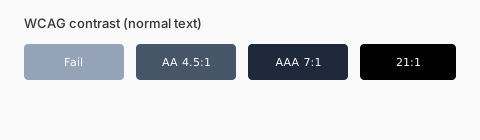
Ratio ranges from 1:1 (identical) to 21:1 (black on white). Body copy below 4.5:1 against its background fails WCAG AA for normal text.
What to test
Test every text/background pair and icon borders users must perceive. Decorative imagery is exempt; form labels are not.
- AA normal text: 4.5:1 minimum
- AA large text (≥18pt or 14pt bold): 3:1
- AAA normal text: 7:1
- Non-text UI components: 3:1 against adjacent colors
Beyond contrast
Do not encode state with color alone — pair hue with icons, labels, or patterns. Document focus styles that survive high-contrast mode.
Who benefits from contrast discipline
Strong contrast helps low-vision users, people on phones in sunlight, and anyone over forty. It also improves scan speed for power users. Treat contrast as a performance feature, not a checkbox.
Components beyond body text
Placeholders, disabled buttons, and chart gridlines still need 3:1 against adjacent colors when they convey meaning. Decorative borders can be subtler, but form field outlines must remain visible.
Process for design systems
Block merges that introduce new text/background pairs without a ratio check. Automate where possible with design tokens, but keep a human review for marketing landing pages that break the system intentionally.