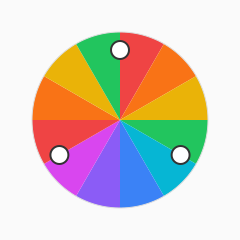
The color wheel
Artists and UI designers organize hues in a circle. Neighbors are analogous; opposites are complementary. Rotating around the wheel changes temperature without changing how light or dark a color feels.
Primary, secondary, tertiary
Mixing primaries yields secondaries; mixing those yields tertiaries. Digital screens use additive RGB primaries (red, green, blue), while print often references subtractive CMY.
- Primary (RGB): red, green, blue
- Secondary: cyan, magenta, yellow
- Tertiary: red-orange, yellow-green, blue-violet, and similar blends
HSL and design tokens
CSS hsl() and modern oklch() let you hold hue steady while nudging lightness for hover states. Token scales (50–950) are usually built by stepping lightness, not by guessing new HEX values.
Putting the wheel to work in UI
When you assign hues to navigation, charts, and tags, keep one dominant temperature per screen. Analogous neighbors (blue + teal) feel cohesive; complementary pairs (blue + orange) create focal points for primary buttons. Document hue angles in your design tokens so engineers can rebuild ramps in OKLCH or HSL without guessing.
Common mistakes on digital screens
Teams sometimes treat the wheel like a random picker. That produces palettes with no shared lightness curve, so hover states look muddy. Step lightness systematically, test neutrals separately, and reserve saturated hues for accents—not paragraph backgrounds.
Next steps with ChromaXP
Use the harmony widget on this page to preview triads from a base hue, then export candidates with the palette generator. When a pair is close to shipping, validate contrast before handoff so accessibility is part of the color story, not a late audit.